Humanizer Midi Plugin
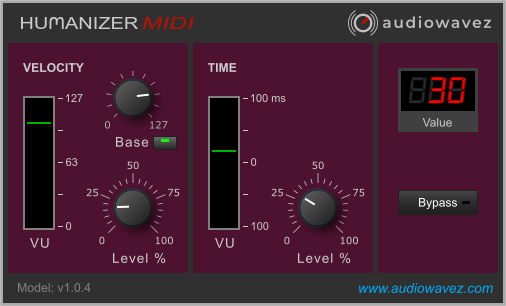 Click the image to see the plugin in its original size.
Description
Does your music sound too rigid or too mechanical? Then you can try to vary the velocity or time of the notes minimally and randomly. This creates a subtle, more human way of playing, since a human cannot play every note exactly the same. The humanizer midi is particularly suitable for loop-based tracks, as each loop sounds different. You no longer need to laboriously move the notes in the editor by hand. Try it out and place the Humanizer in front of an instrument.
Free vs. Humanizer Midi 2
| Feature | Humanizer Midi (Free) | Humanizer Midi 2 (25 €) |
|---|---|---|
| Random timing, ±100 ms | ✔ | ✔ |
| Random velocity variation | ✔ | ✔ |
| Fixed velocity (base) | ✔ | ✔ |
| Output level display | ✔ | ✔ |
| Bypass for A/B comparison | ✔ | ✔ |
| Settings saved with your project | ✔ | ✔ |
| Strum module | – | ✔ |
| Shift (moves all notes earlier or later for a laid-back or pushed feel) | – | ✔ |
| Global knob (scales all modules, 0–100 %) | – | ✔ |
| New Start (new fixed random pattern) | – | ✔ |
| Preset browser | – | ✔ |
| Plugin zoom 50–150 % | – | ✔ |
| Price | Free | one-time (Lifetime license) |
Want more control? Humanizer Midi 2 adds the Strum module, a Global knob and a preset browser.
UpdateVersion 2.0.3 - October 2026
Fix for an issue with saving and loading settings
Loading the video transfers data to YouTube (Google). See our Privacy Policy.
Installation
- Download the plugin and unzip it
- Copy the .vst3 plugin to the VST folder of your DAW
- Done
Features
- Velocity knob for random fluctuations in percent
- fixed velocity (base) adjustable
- VU meter for output control
- random time fluctuations between minus 100ms and plus 100ms adjustable
- set values are shown in a digital 7-segment display
- Bypass button for easy A - B comparison