Humanizer Midi 2 Plugin
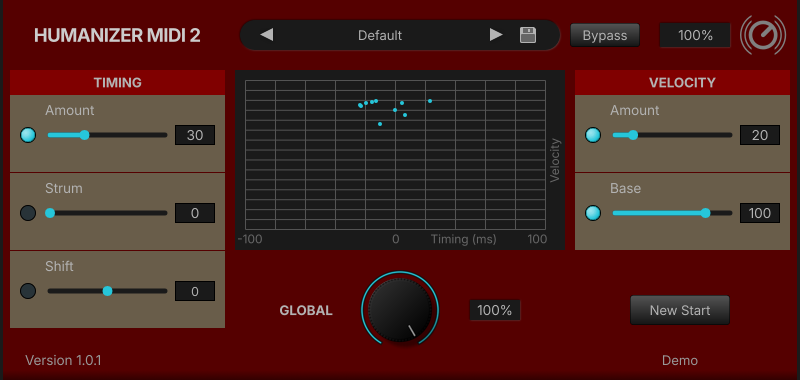 Click the image to see the plugin in its original size.
Unlimited Time Demo
Load and save is disabled
License: Lifetime Deal
One-time payment
Serial number license
No internet required
Sale ends November 15, 2026
Lowest price of the last 30 days: 25.00 €
Description
Make your loops sound played by a human, not a machine.
No more moving notes by hand.
Does your music sound too rigid or too mechanical? Then you can try to vary the velocity or time of the notes minimally and randomly. This creates a subtle, more human way of playing, since a human cannot play every note exactly the same. The humanizer midi is particularly suitable for loop-based tracks, as each loop sounds different. You no longer need to laboriously move the notes in the editor by hand. Try it out and place the Humanizer in front of an instrument.
Manual
Humanizer_Midi_2_Manual.pdf
Update
Version 1.0.5 - August 2026
Fixed: Resolved compatibility issues on certain system configurations
Loading the video transfers data to YouTube (Google). See our Privacy Policy.
Free vs. Humanizer Midi 2
| Feature | Humanizer Midi (Free) | Humanizer Midi 2 |
|---|---|---|
| Random timing, ±100 ms | ✔ | ✔ |
| Random velocity variation | ✔ | ✔ |
| Fixed velocity (base) | ✔ | ✔ |
| Output level display | ✔ | ✔ |
| Bypass for A/B comparison | ✔ | ✔ |
| Settings saved with your project | ✔ | ✔ |
| Strum module | – | ✔ |
| Shift (moves all notes earlier or later for a laid-back or pushed feel) | – | ✔ |
| Global knob (scales all modules, 0–100 %) | – | ✔ |
| New Start (new fixed random pattern) | – | ✔ |
| Preset browser | – | ✔ |
| Plugin zoom 50–150 % | – | ✔ |
| Price | Free | one-time (Lifetime license) |
Features
- Random time fluctuations between minus 100ms and plus 100ms adjustable
- With every start of the song or loop, the humanization sounds exactly the same
- The "New Start" function generates a new fixed random pattern if you do not like the current variation
- Strum Module: Delays the individual notes within an chord slightly, one after another. Transforms rigid MIDI blocks into a natural strum (like on a real guitar or harp).
- Shift: Moves all notes slightly earlier or later by a fixed amount. Gives your MIDI a laid-back or pushed feel.
- Fixed velocity (base) adjustable
- Display for output control
- The Global knob scales the intensity of all modules (Timing, Velocity, etc.) simultaneously from 0% to 100% (full effect)
- Integrated preset browser for custom settings
- Bypass button for easy A - B comparison
- Plugin zoom from 50% to 150%
Installation
- Download the Humanizer_Midi_2.zip and unzip it
- After that, copy all files to the VST folder of your DAW
- Done